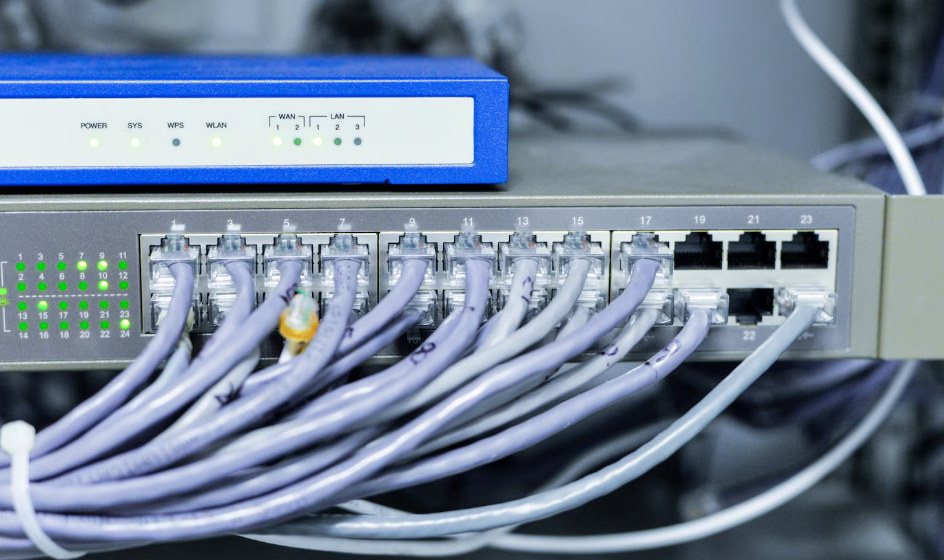

A reliable internet connection is essential for homes, offices, schools, businesses, and many other environments. While wireless networking has become extremely common, wired networking continues to offer important advantages for users who prioritize stability, predictable performance, and controlled access. A non wireless router is designed for networking environments where devices connect through Ethernet cables rather than using built in Wi Fi connectivity.
Understanding how wired routers work can help users choose the right networking equipment for their needs. Although wireless routers are often marketed as an all in one solution, not every network requires wireless access. In some situations, eliminating Wi Fi can simplify network management, reduce unnecessary features, and provide a straightforward wired connection between devices.
What Is a Non Wireless Router?
A non wireless router is a networking device that routes internet traffic between a local wired network and an external network without providing built in wireless connectivity. Devices connect to the router through Ethernet ports and communicate using physical network cables.
The router performs the fundamental routing functions required to direct data between connected devices and the internet. Depending on the model, it may also provide features such as firewall protection, Network Address Translation, DHCP, traffic management, and other network controls.
Unlike a conventional wireless router, a non wireless model does not broadcast a Wi Fi network. This makes it suitable for environments where wireless connectivity is unnecessary or intentionally avoided.
How Does a Wired Router Work?
A wired router receives network traffic and determines where that traffic needs to go. When a computer or other connected device sends a request to the internet, the router forwards the request through the appropriate network connection.
Ethernet cables connect devices to the router’s LAN ports. The router typically connects to an internet modem, fiber terminal, or another upstream network through its WAN interface.
The router then manages communication between the local network and external networks. Depending on its configuration, it can assign IP addresses to connected devices and help protect the network from unwanted traffic.
Because communication takes place through physical cables, the network does not depend on radio signals for local connectivity.
Why Choose a Non Wireless Router?
There are several reasons someone may prefer a wired-only networking setup. One of the most important is connection consistency.
Wireless signals can be affected by walls, interference, distance, other wireless networks, and physical obstacles. A wired Ethernet connection generally provides a more predictable connection between a device and the router.
Security can also be a consideration. A network without wireless broadcasting does not expose a Wi Fi network for nearby devices to discover. Users still need appropriate network security, but removing Wi Fi eliminates one potential access method.
A wired-only router may also be appropriate for specialized environments where wireless networking is unnecessary or restricted.
Advantages of Wired Networking
One major advantage of Ethernet networking is reliability. Once a cable is properly connected and the network is configured correctly, the connection can remain stable without concerns about wireless signal strength.
Wired connections can also provide low latency, which can be useful for applications such as online gaming, video conferencing, remote work, and data transfers.
Another advantage is predictable network performance. Wireless speeds can vary depending on signal conditions, while a wired connection is generally less affected by radio interference.
For fixed devices such as desktop computers, servers, printers, security equipment, and network storage systems, Ethernet can be a practical choice.
Non Wireless Router vs Wireless Router
The main difference between the two types of routers is wireless functionality. A wireless router combines routing with Wi Fi access, allowing devices such as smartphones, tablets, and laptops to connect without Ethernet cables.
A non wireless router focuses exclusively on wired networking. Devices must connect using physical cables unless another wireless access point is added separately.
A wireless router can be convenient for households with many mobile devices. A wired-only router can be useful when wireless access is not needed or when a network administrator wants to manage wireless connectivity separately.
Some businesses may deliberately separate routing from wireless access by using dedicated access points. This approach can provide greater flexibility when expanding or modifying the network.
Common Uses for Non Wireless Routers
Wired routers can be used in many different environments. Offices may use them for desktop computers, servers, network printers, and other fixed equipment.
Small businesses can also use wired networking to connect point of sale systems, workstations, storage devices, and other infrastructure.
In laboratories, industrial environments, and specialized facilities, wired connections may be preferred because equipment often remains in fixed locations.
Home users can also benefit from a wired-only network if most devices are stationary and wireless connectivity is not required.
Another common approach is to use a wired router as the central networking device and add a separate wireless access point only where Wi Fi coverage is needed.
Security Considerations
A wired network can reduce some wireless-specific security concerns, but it does not automatically make a network completely secure.
Users should still protect router administration interfaces with strong passwords and keep networking equipment updated with current firmware. Unnecessary services should be disabled when possible.
Physical security is also important because Ethernet cables provide direct network access to connected devices. Network administrators should control access to network ports in offices and other shared environments.
Firewalls, access controls, network segmentation, and secure configuration can provide additional protection.
For business environments, administrators may also create separate network segments for employees, servers, guest devices, and other categories of equipment.
Speed and Performance
Ethernet technology has developed significantly over the years. Depending on the router, network cards, cables, and other equipment, wired networks can support high data-transfer speeds.
For users transferring large files between computers or accessing network-attached storage, a wired connection can provide consistent performance.
However, the actual speed of a network depends on the entire connection chain. A high-speed router cannot automatically provide its maximum performance if connected devices, Ethernet cables, switches, or internet services operate at lower speeds.
Choosing compatible equipment is therefore important when building a high-performance wired network.
Choosing the Right Ethernet Ports
The number and type of Ethernet ports are important considerations when selecting a router. Users should estimate how many devices need direct connections and determine whether additional ports will be required in the future.
If a router does not provide enough ports, an Ethernet switch can be connected to expand the number of available wired connections.
Businesses may need additional considerations such as managed switching, VLAN support, link aggregation, or higher-speed Ethernet depending on their network requirements.
Home users with only a few wired devices may need a simpler configuration.
Router Features to Consider
Different wired routers offer different features. Users should evaluate their requirements before choosing a device.
Important features can include gigabit Ethernet or faster ports, firewall functionality, DHCP support, VLAN capabilities, Quality of Service controls, VPN functionality, parental controls, traffic monitoring, and firmware support.
Business users may require advanced routing and security capabilities that are unnecessary for a basic home network.
It is also important to consider the manufacturer’s update policy and the expected lifespan of the device. A router is part of the network’s security infrastructure, so long-term software support can be valuable.
Can a Non Wireless Router Provide Wi Fi?
A non wireless router does not provide built in Wi Fi, but wireless connectivity can still be added to the network.
Users can connect a separate wireless access point to one of the router’s Ethernet ports. The access point then provides Wi Fi while the router continues handling routing and other network functions.
This arrangement can be useful when users want greater control over wireless coverage. Access points can be positioned in suitable locations, and multiple access points can be deployed in larger buildings.
Separating routing and wireless access also allows components to be upgraded independently.
Setting Up a Wired Router
Setting up a wired router generally begins by connecting the router to the internet service equipment through its WAN or internet port. Ethernet cables can then be connected from the router’s LAN ports to computers, switches, or other wired devices.
The router’s administration interface can be used to configure network settings, internet access, security options, and other features.
After configuration, connected devices should receive appropriate network settings and be able to communicate with the internet.
Users should also change default administrative credentials and apply available firmware updates before relying on the router for everyday network activity.
Is a Non Wireless Router Right for You?
The right networking equipment depends on how a network is used. A non wireless router can be a practical option for users who primarily connect fixed devices and do not need integrated Wi Fi.
It may also be useful for businesses that prefer dedicated wireless access points or organizations with specific network security requirements.
On the other hand, households with smartphones, tablets, laptops, smart home equipment, and other wireless devices may need a separate access point if they choose a wired-only router.
The key is to consider the number of devices, required speed, network layout, security requirements, and future expansion plans before making a decision.
Final Thoughts
A non wireless router provides a straightforward approach to network routing for environments that rely primarily on Ethernet connections. Its wired design can offer stable connectivity, predictable performance, and greater control over how network devices are connected. While wireless routers remain convenient for many users, a wired-only setup can be useful for offices, specialized environments, and homes where fixed Ethernet connections are preferred. With the addition of separate switches or wireless access points, users can also expand the network as their requirements change.
FAQs
1. What is a non wireless router?
A non wireless router is a networking device that provides routing and wired network connectivity without built in Wi Fi functionality. Devices connect to it using Ethernet cables.
2. Is a non wireless router more secure than a wireless router?
It can eliminate some wireless-specific security risks because it does not broadcast a Wi Fi network. However, proper passwords, firmware updates, firewalls, and access controls are still important.
3. Can I connect Wi Fi to a non wireless router?
Yes. A separate wireless access point can be connected to the router through Ethernet, allowing Wi Fi devices to access the network.
4. Is Ethernet faster than Wi Fi?
Ethernet can provide highly consistent performance and low latency, but actual speeds depend on the router, cables, network hardware, and internet service.
5. Who should use a non wireless router?
It can be suitable for users who primarily need wired connections, businesses with dedicated wireless access points, and environments where wireless connectivity is unnecessary or intentionally separated from the main routing equipment.



[…] Read more: Non Wireless Router: A Complete Guide to Wired Network Connectivity […]