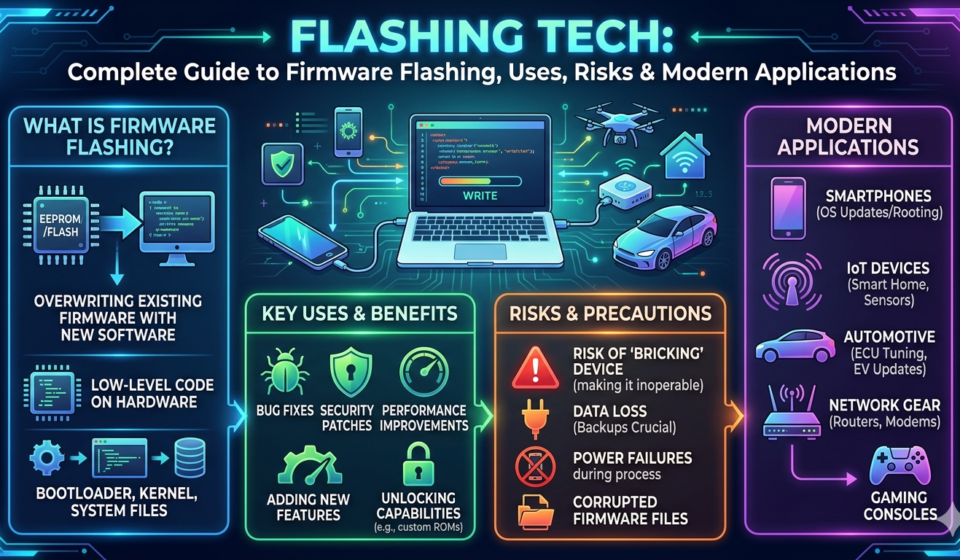

Flashing tech is one of those terms that often appears when dealing with smartphones, computers, and embedded devices but most people don’t fully understand what it means until something goes wrong with their device. Whether it’s installing a new operating system, fixing a bricked phone, or updating firmware manually, flashing technology plays a critical role in modern digital systems.
In simple terms, flashing tech refers to the process of installing or rewriting firmware on a device’s internal memory. It is widely used by technicians, developers, and advanced users to repair, upgrade, or customize devices beyond their default capabilities.
In this detailed guide, we’ll break down everything you need to know about flashing tech how it works, why it’s used, the risks involved, and the tools professionals rely on. This article is designed to give you both practical understanding and technical depth so you can confidently navigate the world of firmware flashing.
What Is Flashing Tech?
Flashing tech refers to the process of writing new firmware or software directly onto a device’s non-volatile memory, such as ROM, flash storage, or EEPROM.
Firmware is the low-level software that controls hardware functions. Unlike regular applications, firmware runs directly on the device hardware and is essential for booting and system operations.
Key Concept
Flashing = Replacing or updating firmware stored in a device’s internal memory.
Where Flashing Tech Is Used
- Smartphones (Android and feature phones)
- Computers (BIOS/UEFI updates)
- Routers and networking devices
- Smart TVs and IoT devices
- Embedded industrial systems
When done correctly, flashing tech can restore functionality, improve performance, or unlock new features. However, incorrect flashing can render a device unusable (commonly called “bricking”).
How Flashing Tech Works
Understanding how flashing works requires a basic knowledge of device architecture.
1. Bootloader Stage
Every device has a bootloader—a small program that starts when the device is powered on. It prepares the system and allows firmware installation in recovery or flashing mode.
2. Firmware Package
A firmware file typically contains:
- Operating system kernel
- Device drivers
- System configurations
- Recovery partitions
3. Flashing Process
The flashing process involves:
- Connecting the device to a computer or using recovery mode
- Putting the device into flash mode (e.g., Fastboot or Download Mode)
- Sending firmware files to device storage
- Overwriting existing system partitions
- Rebooting the system with new firmware
4. Verification
Modern devices often verify firmware signatures to ensure security and prevent unauthorized modifications.
Types of Flashing Tech
Flashing tech is not limited to smartphones. It spans multiple industries and device types.
1. Smartphone Flashing
This is the most common form of flashing. It includes:
- Installing stock firmware
- Installing custom ROMs
- Rooting devices
- Fixing software issues
Popular tools:
- Fastboot (Android)
- Odin (Samsung devices)
- SP Flash Tool (MediaTek devices)
2. BIOS/UEFI Flashing (Computers)
This involves updating or replacing motherboard firmware.
Uses include:
- Hardware compatibility improvements
- Security patches
- Performance optimization
3. Embedded Systems Flashing
Used in industrial devices, medical equipment, and IoT systems to:
- Update control software
- Fix system bugs
- Improve efficiency
4. Router and Network Device Flashing
Used for:
- Installing custom firmware like OpenWRT
- Improving network performance
- Unlocking advanced features
Why Flashing Tech Is Used
Flashing tech is widely used for both maintenance and customization purposes.
1. Device Repair
Flashing can fix:
- Boot loops
- Software crashes
- Corrupted system files
- Bricked devices (in some cases)
2. Performance Improvement
New firmware may:
- Optimize CPU usage
- Improve battery life
- Enhance system stability
3. Software Updates
Manufacturers release firmware updates to:
- Patch security vulnerabilities
- Fix bugs
- Add features
4. Customization
Advanced users use flashing tech to:
- Install custom ROMs
- Remove bloatware
- Unlock hidden features
5. Device Unbricking
If a device becomes unresponsive due to software failure, flashing stock firmware can sometimes restore it.
Risks and Challenges of Flashing Tech
Despite its usefulness, flashing tech carries significant risks.
1. Bricking the Device
A “bricked” device becomes unusable due to incorrect firmware installation.
- Soft brick: recoverable
- Hard brick: often irreparable
2. Data Loss
Flashing usually wipes all stored data, including:
- Photos
- Apps
- Contacts
- Settings
3. Warranty Void
Manufacturers may void warranty if unauthorized firmware is installed.
4. Security Risks
Installing unofficial firmware can expose devices to:
- Malware
- Backdoors
- Data theft
5. Compatibility Issues
Incorrect firmware versions may lead to:
- Network failure
- Camera malfunction
- Touchscreen issues
Step-by-Step Overview of Flashing Tech (General Guide)
Note: This is a conceptual overview, not a device-specific tutorial.
Step 1: Identify Device Model
Always confirm exact model number before downloading firmware.
Step 2: Download Official Firmware
Use trusted sources like manufacturer websites.
Step 3: Install Required Drivers
USB drivers ensure proper device recognition.
Step 4: Enter Flash Mode
Common modes include:
- Fastboot Mode (Android)
- Download Mode (Samsung)
- Recovery Mode
Step 5: Connect Device to PC
Use a reliable USB cable to avoid interruptions.
Step 6: Launch Flashing Tool
Load firmware into the appropriate tool.
Step 7: Start Flashing Process
Do not disconnect device during installation.
Step 8: Reboot and Verify
Check system stability after flashing completes.
Tools Used in Flashing Tech
Different devices require different tools.
1. Fastboot
Used for Android devices to flash partitions and boot images.
2. Odin
Samsung’s proprietary tool for firmware flashing.
3. SP Flash Tool
Commonly used for MediaTek-based smartphones.
4. QFIL (Qualcomm Flash Image Loader)
Used for Qualcomm chipset devices.
5. BIOS Flash Utilities
Manufacturers provide tools for motherboard firmware updates.
Best Practices for Safe Flashing Tech
Following best practices reduces risk significantly.
1. Always Backup Data
Before flashing:
- Backup contacts and media
- Save app data
- Export important files
2. Use Correct Firmware
Never flash firmware from a different device model.
3. Ensure Battery Stability
Keep battery above 50% to prevent shutdown during flashing.
4. Avoid Interruptions
Do not:
- Disconnect cable
- Turn off computer
- Close flashing software
5. Verify Sources
Only download firmware from trusted and official sources.
6. Understand Bootloader Status
Locked bootloaders may restrict flashing options.
The Future of Flashing Tech
Flashing tech is evolving rapidly as manufacturers move toward more secure and automated systems.
1. OTA Updates Reducing Manual Flashing
Over-the-air updates are replacing manual firmware installation for most users.
2. Stronger Security Systems
Modern devices use:
- Secure Boot
- Verified Boot
- Encryption layers
These reduce unauthorized flashing attempts.
3. AI-Based Recovery Systems
Future systems may automatically repair corrupted firmware without manual intervention.
4. Modular Firmware Design
Devices are shifting toward modular firmware updates instead of full system flashes.
5. Cloud-Based Firmware Management
Enterprise and IoT systems increasingly rely on cloud-controlled firmware updates.
Conclusion
Flashing tech is a powerful and essential part of modern digital device management. From repairing malfunctioning smartphones to updating BIOS systems and customizing software experiences, firmware flashing plays a critical role in keeping devices functional and up to date.
However, it is not without risks. Incorrect flashing can lead to data loss, system failure, or permanent device damage. That’s why understanding the process, using the right tools, and following best practices is crucial.
As technology evolves, flashing is becoming more secure, automated, and user-friendly—but it remains an important skill for technicians, developers, and advanced users who want full control over their devices.
Frequently Asked Questions (FAQ)
1. What is flashing tech in simple terms?
Flashing tech is the process of installing or updating firmware on a device’s internal memory to repair or modify its software system.
2. Is flashing a phone safe?
It is safe if done correctly with official firmware, but incorrect flashing can permanently damage the device.
3. Does flashing delete all data?
Yes, in most cases flashing erases all user data unless a specific method preserves it.
4. Can flashing fix a dead phone?
Yes, if the phone is soft-bricked. However, hard-bricked devices may require hardware repair.
5. What tools are used for flashing tech?
Common tools include Fastboot, Odin, SP Flash Tool, and QFIL depending on the device type.
6. Is flashing the same as rooting?
No. Flashing installs firmware, while rooting gives administrative access to the operating system.
7. Why do people use custom ROMs?
Users install custom ROMs for better performance, customization, and extended device support.